DOWNLOAD GUIDE
Sakura Editor Download: v2.4.3 and Safe Setup Guide
The latest release checked on September 23, 2026 is v2.4.3 from the official GitHub project. This independent guide links to the official release files, explains Installer versus Portable choices, and shows how to verify a ZIP before opening it.
Checked 2026-09-23
Quick answer: choose the official v2.4.3 ZIP for your workflow
For a Sakura Editor download, start at the official GitHub release rather than a reposted software page. The v2.4.3 release checked here contains two Win32 ZIP assets: an Installer archive and an Exe archive. Decide how you will manage the editor, then compare the tag, filename, extension, and byte size before extracting the file.
| Item | Checked value on September 23, 2026 | How to use it |
|---|---|---|
| Latest release | v2.4.3, published 2026-08-08 | Confirm the release tag and date |
| Installer | Win32-Release-Installer.zip / 6,388,224 bytes | Candidate for a normal PC installation |
| Portable | Win32-Release-Exe.zip / 3,513,182 bytes | Candidate for testing from an extracted folder |
| Naming note | The official filenames say Win32 | Do not infer 64-bit support from that label |
OFFICIAL LINKS
Open the official release files
This site does not store or re-distribute the installer or ZIP files. The links below use stable GitHub release URLs. At the destination, confirm that the version and filename still match before downloading.
GitHub may redirect a stable asset URL to a temporary signed address. This page stores only the stable release URL, not a signed query-string URL.
Check the latest version and official source
Software roundup pages can contain an old version, an advertising redirect, or a download button for a different file. To verify the Sakura Editor download source, open the sakura-editor GitHub repository, select Releases, and compare the v2.4.3 tag, publication date, and asset filenames in order.
This version check compared the GitHub latest release with the official project site. v2.4.3 was published on August 8, 2026, and its release notes list several security fixes, including fixes related to opening PowerShell and WSH macro execution. Read the linked GHSA, JVN, and release notes for scope; do not treat a short third-party summary as a complete safety assessment.
Installer versus Portable: which file should you choose?
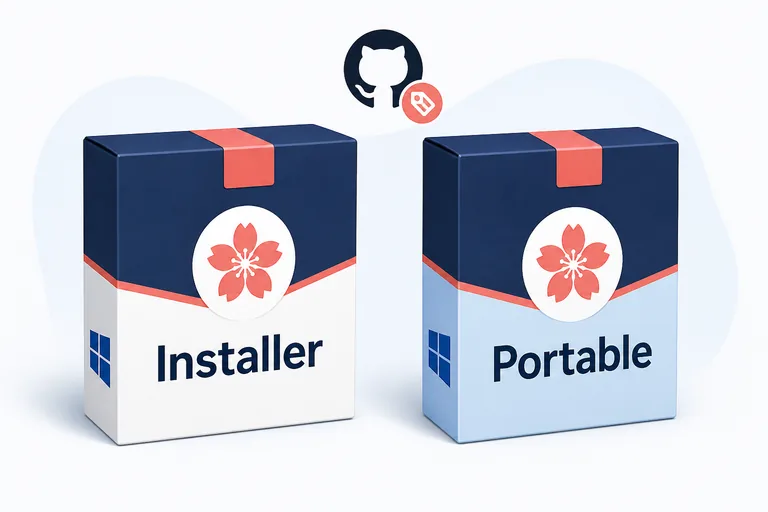
The Installer ZIP is a practical candidate when Sakura Editor will be installed for regular use on one Windows PC. You can inspect the extracted files before running setup, then review the install location and shortcut behavior. If the computer is managed by an organization, check its software and permission policy before starting an installer.
The Exe ZIP is a practical candidate when you want to test the editor from an extracted folder. A search result may call it Portable, but that word alone does not guarantee a particular settings location, registry behavior, or 64-bit build. The verified official filename is Win32-Release-Exe.zip, so use the release description rather than guessing from a label.
| Goal | File to inspect first | Check after download |
|---|---|---|
| Regular PC setup | Win32-Release-Installer.zip | Review the setup file and install location |
| Separate folder test | Win32-Release-Exe.zip | Review the executable and settings location |
| Looking for 64-bit | The actual official asset name | Do not reinterpret Win32 as 64-bit |
| Moving from an old guide | The v2.4.3 release page | Do not reuse an old URL or file size |
Verify the file after downloading
Do not run the file immediately after clicking a download button. First check the saved filename and extension. Both v2.4.3 assets checked here are ZIP files, and their official metadata matched the HTTP Content-Length returned during verification. If your copy is zero bytes, unexpectedly smaller, or has a different extension, do not extract it; return to the official release and download it again.
Choose an extraction folder that is easy to remove and back up. Treat an archive received from an email attachment or an unknown mirror differently from an official release asset. On a work computer, the organization's antivirus and software-installation rules take priority over this general guide.
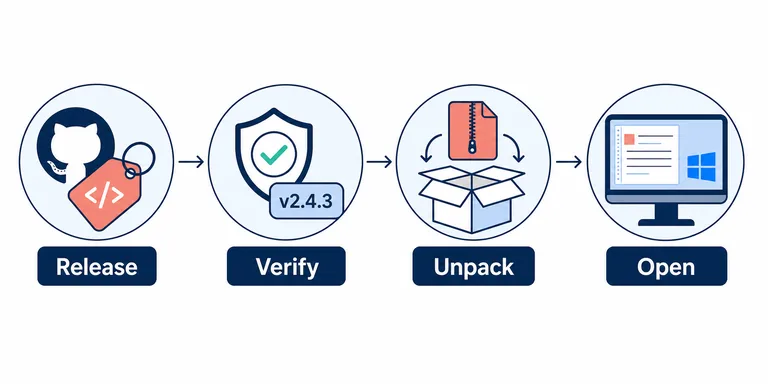
- Open the releaseCheck the v2.4.3 tag, publication date, and Assets on the official GitHub release.
- Verify the versionConfirm that the linked filename contains v2.4.3 and Win32-Release.
- Unpack the ZIPMake a working copy, then review the extracted file structure and size.
- Open the editorFollow setup instructions for Installer, or start the executable from the Exe folder.
Install or start the editor after extraction
With the Installer choice, read the setup instructions after extracting the ZIP. Review the destination folder, Start menu entry, and shortcut behavior. If Windows requests administrator permission, follow the computer owner's or organization's policy. If the screen differs from the official notes or your expected environment, cancel and verify the file source before continuing.
With the Exe ZIP choice, start the executable from the extracted folder. The location of settings can depend on how the program is started, the permissions available, and Sakura Editor's own configuration. Before moving the folder to another PC, read the settings-export and character-encoding guides so working files and configuration files do not get mixed together.
- Test a copyStart in a new working folder without overwriting important settings or business files.
- Check basic actionsBegin with a small test: open text, save it, and run a search.
- Check encodingFor UTF-8 or Shift_JIS files, choose a save format only after the text is readable.
- Keep the originalKeep a copy so you can review line endings and a diff before overwriting the source.
Checks to make after the first start
A successful launch is only the beginning. Use a small file that resembles your normal work. If you need search and replace, search first, review the result count and scope, and only then replace. For Markdown or configuration files, do not assume that syntax coloring on screen is identical to the string that will be saved.
If text is garbled, separate encoding, BOM, and line-ending checks before pressing Save repeatedly. If a diff looks unexpectedly large, compare the intended text edit with line-ending and whitespace changes using Sakura Editor or this site's text-diff tool.
| Check | Small test | When it fails |
|---|---|---|
| Open a file | Open a short UTF-8 text file | Do not save while encoding is only guessed |
| Search and replace | Search a one-match copy | Review the result before replacing |
| Line endings | Inspect a CRLF or LF sample | Separate line endings from character encoding |
| Settings | Change one display or shortcut setting | Record where the settings are stored |
What v2.4.3 changes and what to recheck later
The official v2.4.3 release notes list security fixes involving the Open PowerShell feature, ExecCmd through WSH macros, filenames used when starting a controlled process, and long-path handling. The useful conclusion is that a release note exists and should be read, not that a short article can certify every environment as safe. Follow the linked GHSA, JVN, and project notes for the affected scope and recommended action.
Software versions change. The next time you need a Sakura Editor download, do not copy v2.4.3 from a search snippet. Recheck the latest release tag, publication date, asset filenames, and sizes on GitHub. This page is tied to the September 23, 2026 verification date; an old asset should lead you back to the official release instead of being opened blindly.
Frequently asked questions
Frequently asked questions
What is the latest Sakura Editor version?
The latest release shown by the official GitHub project on September 23, 2026 was v2.4.3, published on August 8, 2026. Releases can change, so check the official release list when you download it.
Where should I download Sakura Editor?
Start from the sakura-editor GitHub repository and its v2.4.3 release. This page lists stable asset URLs, but compare the final tag and filename at GitHub and do not treat a third-party mirror as official.
Should I choose Installer or Portable?
Choose the Installer ZIP for a normal PC setup and the Exe ZIP when you want to test from an extracted folder. The official names are Win32-Release-Installer.zip and Win32-Release-Exe.zip; the word Portable alone does not prove a settings or 64-bit behavior.
Can I download a 64-bit Sakura Editor build?
The v2.4.3 official assets checked here use Win32 in their filenames. Do not infer 64-bit availability from a search phrase; read the official release description and project documentation for the actual supported build.
What should I do after downloading the ZIP?
Check the v2.4.3 tag, filename, extension, and byte size, then extract a working copy. Follow setup instructions for the Installer archive or start the executable from the Exe archive. Test open, save, and search on a small file before touching an important source.
Is this the official Sakura Editor website?
No. This is an independent, unofficial wiki. It does not host the official files; it records version facts and points to official sources. Use the official repository, release notes, and help pages as the authority for files and changes.